STSPIN220 Stepper Motor Library for Arduino
STSPIN220 Stepper Motor Library
Ultra-quiet stepper motor control with 1/256 microstepping precision
LIBRARY DOWNLOAD
GitHub Repository| Component | Specification | Notes |
|---|---|---|
| Microcontroller | Arduino-compatible board | Arduino Mega, Uno, ESP32, etc. |
| Motor Driver | STSPIN220 breakout board | Silent stepper driver |
| Stepper Motor | Bipolar, <1.2A current rating | Low-current motors recommended |
| Power Supply | Appropriate for motor specs | Match motor voltage requirements |
| Connections | Jumper wires & breadboard | For prototyping |
| Programming | USB cable | For code upload |
Development Environment
- PlatformIO - Advanced embedded development
- VS Code - Recommended IDE with PlatformIO extension
What is STSPIN220?
The STSPIN220 is a cutting-edge stepper motor driver offering:
Key Features
- Ultra-high Resolution: 1/256 microstepping for smooth motion
- Silent Operation: Significantly reduces motor noise and vibration
- Low Power Design: Optimized for battery-powered applications
- Compact Form Factor: Ideal for space-constrained projects
Important Limitations
Current Rating: Designed for low-current stepper motors (<1.2A)
Not Suitable For: High-power motors like NEMA 17+ industrial steppers
Perfect For: Small robotic applications, camera gimbals, precision instruments
Technical Specifications
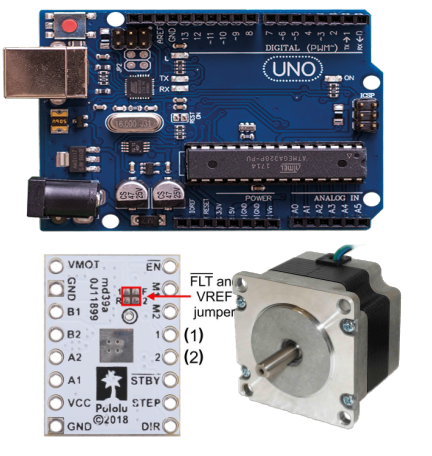
\ud83d\udcca Performance Chart: The image above shows the optimal connection setup for achieving maximum precision with minimal noise.
\ud83d\udd17 Documentation & Resources
- \ud83d\udcc4 Official Datasheet - Complete technical specifications
- \ud83d\udd27 Library Source - Arduino library with examples
- \ud83d\udcda API Documentation - Included in repository README
\ud83c\udfa8 Compatible Driver Boards
This library is designed for Pololu-compatible stepper driver boards featuring:
- STSPIN220 motor driver IC
- Standard pinout configuration
- 3.3V/5V logic compatibility
Getting Started
Ready to add precision motor control to your project? Check out the library repository for:
This library diverges from others that are around, in that it assumes that the MS1, MS2, MS3(DIR) and MS4(STEP) pins are connected to gpio pins on the Arduino, allowing control over the microstepping modes.
The Stepper_STSPIN220 is capable of microstepping down to 1/256 of a step, enabling fine control over the stepper motor. This fine control can be used in, among other things, 3D printers.
This library provides an interface for setting the different step modes, going from full step down to 1/256 step, using a simple setter function, where the argument is 1, 2, 4, 8, 16, 32, 64, 128 or 256.
At just after the reset or wake up from standby the device is then only able to set the microstepping mode.
| SL NO. | MODE4(DIR) | MODE3(STCK) | MODE2 | MODE1 | Step mode |
|---|---|---|---|---|---|
| 1. | 0 | 0 | 0 | 0 | Full step |
| 2. | 0 | 1 | 0 | 1 | 1/2 step |
| 3. | 1 | 0 | 1 | 0 | 1/4th step |
| 4. | 1 | 1 | 0 | 1 | 1/8th step |
| 5. | 1 | 1 | 1 | 1 | 1/16th step |
| 6. | 0 | 0 | 1 | 0 | 1/32nd step |
| 7. | 1 | 0 | 1 | 1 | 1/64th step |
| 8. | 0 | 0 | 0 | 1 | 1/128th step |
| 9. | 0 | 0 | 1 | 1 | 1/256th step |
Note: Lower delay values can be used in the microstepping mode. Values as low as 25 usec can be used in the 1/256 mode with some motors(for more info refer to the datasheet).
File content :
Stepper_STSPIN220.cpp -- cpp file for using the Stepper_STSPIN220 stepper driver.Stepper_STSPIN220.h -- header file for the declaration of fuction and class of the stepper driver.
Functions contained in the library:
Stepper_STSPIN220 : Stepper class fuctions
Stepper_STSPIN220(unsigned long motor_steps, int ms1_pin, int ms2_pin, int ms3_pin, int ms4_pin, int enable_pin)This is the constructor fuction call at the initialization of file.
unsigned long motor_steps: put the total no. of motor stepsint ms1_pin: define the pin from arduino boardint ms2_pin: define the pin from arduino boardint ms3_pin: define the pin from arduino boardint ms4_pin: define the pin from arduino boardint enable_pin: if pin is there then give the pin no. (default is -1)
void setDelay(unsigned long delay)This should be used to provide delay (microsecond). For stepper motor stepping:unsigned long delay: pass the delay in microseconds
void enable(bool val);Can work only when the enable pin is activated:bool val: passtrueorfalseto enable or disable the motor
void setSpeed(long whatSpeed)Set the speed of the stepper motor, which is running in the value of RPM:long whatSpeed: pass speed as parameter
int version(void)Return the current software versionvoid setDirection(bool direction)Set the stepper direction in clockwise and counter-clockwise directions:bool direction: pass the direction astrueorfalse
void step(unsigned long num_steps)Take the number of steps as parameter and loop for that number of steps:static unsigned long num_steps: provide the total number of steps to run
void setStepMode(int stepMode)Only take power of 2 as in input e.g, 1, 2, 4, 8, 16, 32, 64, 128 or 256.int stepMode: pass the microstepping value that is described above.
Testing:
To run the library in your system, please run the example.ino file and make some adjustments according to your pin connections and microstepping configuration, as shown in the file below.
 1int MODE_1 =  6;                    // Pin 6
 2int MODE_2 =  7;                    // Pin 7
 3int MODE_3 =  8;                    // Step Pin 8
 4int MODE_4 =  9;                    // Direction Pin 9
 5int microstepping = 64;             // Set microstepping mode: 1, 2, 4, 8, 16, 32, 64, 128 or 256
 6unsigned long MOTOR_STEPS = 200;    // Total steps per revolution for motor in full step
 7unsigned long MOTOR_STEPS_TOTAL = MOTOR_STEPS * long(microstepping); // Total number of motor steps
 8int EN     = -1;                    // No pin defined
 9
10int speed  = 10;                    // Either set speed or give delay
11unsigned long stepdelay = 2000;     // Microseconds delay; Higher value = more rapid changes between positions, lower = softer transitions
Help in improving the guide :
Please if you find any useful improvement feel free to contact at : @pranav083 or comment below.